GNAP – Marking Eligible in Oasis
Determine If a Neighbor Is Eligible To Receive GNAP food
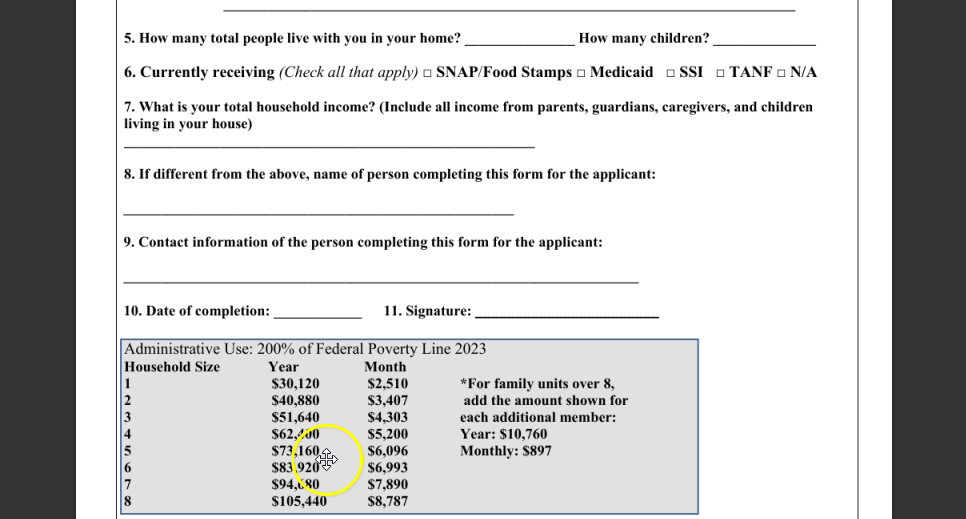
Confirm that there is a minor child in the house under the age of 18. Additionally, confirm that this household meets at least one of the following criteria:
- The family falls below the income guidelines listed on the GNAP Eligibility Form.
- The family is currently enrolled in TANF or TANF Transitional Services.
- The family is considered “At Risk,” meaning they receive Medicaid, Food Stamps/EBT, or Social Security Income (SSI).
The GNAP Eligibility Form and detailed instructions for determining eligibility can be found on the Partner Resources page at https://www.acfb.org/partner-resources/. Click “Current Partner,” then “Forms & Reporting,” and select the “GNAP Eligibility Form.”
From the neighbor’s case in Oasis, select “Edit Case.” Open the “Income & Expenses” tab and enter the neighbor’s income. Next, select the “GNAP” tab. If the GNAP tab does not appear when editing or adding a case, contact your Oasis team lead to have it added. Answer the GNAP eligibility questions based on your initial screening, then select “Save Changes.”
If the neighbor has minor children in the home under 18, verify that they have been added to the household in the “Relationships” tab. Based on the information entered regarding GNAP eligibility, a banner will appear on the neighbor’s case indicating whether they are eligible or not eligible to receive GNAP food.